Dual Stack IPv4 and IPv6 High Availability Network Design and Simulation Using Cisco Packet Tracer
This assignment aims at the design, simulation, and connectivity check of the network using Packet Tracer.
1. Overview
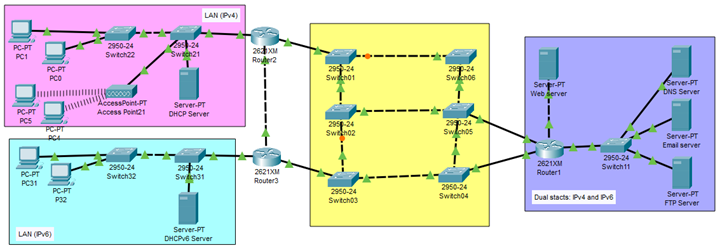
Your organization operates four interconnected high-availability networks, each designed with proper segmentation, resilience, and redundancy. Each network hosts different services and is connected through a multi-switch core infrastructure.
Your task as a network engineering team is to design, configure, and simulate this high-availability dual-stack network using Cisco Packet Tracer, based on the provided reference topology.
This assignment evaluates your ability to configure:
IPv4 and IPv6 dual-stack addressing
VLAN segmentation
Dynamic routing protocols
Server roles (DNS, Web, Email, FTP)
Wireless networks with RADIUS authentication
Redundant switch topologies
End-to-end connectivity and testing
2. Group Formation
Each group must consist of 2 to 4 students.
Students are free to form their own group but must be within the same lecture session.
Each group must do the following:
Select a group ID in eBwise
Register the group member list through eBwise
Prepare the IPv4 and IPv6 addressing scheme based on one the member’s date of birth (see Section 4).
3. Network Scenario Description
Your simulation must implement four interconnected networks, as shown in the reference diagram.
3.1 Network 1 – IPv4 User Network (Pink Area)
Wired and wireless IPv4 clients
DHCPv4 Server for address assignment
Access Point for WLAN connectivity
Router2 as the default IPv4 gateway
3.2 Network 2 – IPv6 User Network (Blue Area)
IPv6-only clients
DHCPv6 Server / SLAAC
Router3 as the IPv6 default gateway
3.3 High Availability Core Network (Yellow Area)
Multi-switch redundant topology
Spanning Tree Protocol (STP) required
Trunk links between switches
3.4 Dual Stack Server Network (Purple Area)
DNS Server
Web Server (HTTP)
Email Server (SMTP/POP3)
FTP Server
All servers must be configured with static IPv4 and static IPv6 dual stack
CSN6224 advanced networking assignments often challenge students with dual-stack IPv4/IPv6 design, VLAN segmentation, dynamic routing (OSPFv2/OSPFv3), and Cisco Packet Tracer simulations. Managing practical configurations alongside a detailed technical report requires strong hands-on knowledge and clear documentation. If you are looking for Computer Network Assignment Help Malaysia that covers both implementation and reporting, Malaysia Assignment Help offers complete support. All projects are 100% human-written, AI-free, and plagiarism-free, aligned with MMU academic standards. Through MMU Assignment Help, students can get expert assistance for networking assignments at any level. and Explore our expert written computer assignment samples.
Answer
UP TO
15
%DISCOUNT
Instant Paper Writing Services by Native Malaysia Writers