
CSN6224 Computer Network Assignment Guidlines 2026 | MMU Malaysia
Assignment Type
Individual Assignment
Subject
CSN6224 Computer Network
Uploaded by Malaysia Assignment Help
Date
01/19/2026
CSN6224 ASSIGNMENT GUIDELINES
Dual Stack IPv4 and IPv6 High Availability Network Design and Simulation Using Cisco Packet Tracer
This assignment aims at the design, simulation, and connectivity check of the network using Packet Tracer.
1. Overview
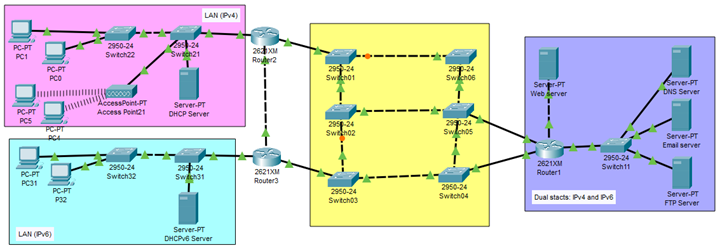
Your organization operates four interconnected high-availability networks, each designed with proper segmentation, resilience, and redundancy. Each network hosts different services and is connected through a multi-switch core infrastructure.
Your task as a network engineering team is to design, configure, and simulate this high-availability dual-stack network using Cisco Packet Tracer, based on the provided reference topology.
This assignment evaluates your ability to configure:
- IPv4 and IPv6 dual-stack addressing
- VLAN segmentation
- Dynamic routing protocols
- Server roles (DNS, Web, Email, FTP)
- Wireless networks with RADIUS authentication
- Redundant switch topologies
- End-to-end connectivity and testing
2. Group Formation
- Each group must consist of 2 to 4 students.
- Students are free to form their own group but must be within the same lecture session.
- Each group must do the following:
- Select a group ID in eBwise
- Register the group member list through eBwise
- Prepare the IPv4 and IPv6 addressing scheme based on one the member’s date of birth (see Section 4).
3. Network Scenario Description
Your simulation must implement four interconnected networks, as shown in the reference diagram.
3.1 Network 1 – IPv4 User Network (Pink Area)
- Wired and wireless IPv4 clients
- DHCPv4 Server for address assignment
- Access Point for WLAN connectivity
- Router2 as the default IPv4 gateway
3.2 Network 2 – IPv6 User Network (Blue Area)
- IPv6-only clients
- DHCPv6 Server / SLAAC
- Router3 as the IPv6 default gateway
3.3 High Availability Core Network (Yellow Area)
- Multi-switch redundant topology
- Spanning Tree Protocol (STP) required
- Trunk links between switches
3.4 Dual Stack Server Network (Purple Area)
- DNS Server
- Web Server (HTTP)
- Email Server (SMTP/POP3)
- FTP Server
- All servers must be configured with static IPv4 and static IPv6 dual stack
- Router1 acts as the gateway to the server network
3.5 Additional Network – Wireless + RADIUS (Router4)
You must add a fifth network using:
- A new router (Router4) connected to any switch in the core network
- Three wireless networks (WLANs)
- A RADIUS server for authenticated access (WPA2-Enterprise or WPA2-Personal)
- DHCP server for wireless address allocation
4. IP Addressing Requirements
4.1 IPv4 Addressing (DOB-Based)
Each network requiring IPv4 must use a unique /24 subnet derived from a group member’s birthdate.
Format:
202.<day>.<month>.0/24
Example (DOB: 28 May 2005):
- IPv4 Subnet: 202.28.5.0/24
Each network must use a different group member’s DOB.
4.2 IPv6 Addressing (DOB-Based)
Each IPv6 or dual-stack network must use a unique /64 IPv6 prefix based on the DOB of a group member.
Format:
2001:db8:DDMM:YYYY::/64
Where:
- DD = day
- MM = month
- YYYY = year
Example (DOB: 28 May 2005):
- IPv6 Subnet: 2001:db8:2805:2005::/64
Each network must use a different IPv6 /64 derived from group members.
5. VLAN Requirements
You must implement VLAN segmentation according to the reference diagram:
- VLAN for IPv4 user network
- VLAN for IPv6 user network
- VLAN(s) in the core backbone
- VLAN for dual-stack server network
- VLAN(s) for the Router4 wireless networks
Trunk links must be configured where VLAN traffic traverses multiple switches.
6. Router Configuration Requirements
All routers must run dynamic routing protocols for both IPv4 and IPv6.
You may choose:
- RIP v2 (IPv4) + RIPng (IPv6), or
- OSPFv2 (IPv4) + OSPFv3 (IPv6) (recommended)
Routing must allow:
- IPv4 and IPv6 clients to reach all servers
- Communication between all networks
- Wireless networks to access all services
7. Wireless + RADIUS Requirements (Router4 Network)
7.1 Wireless Networks
Create three WLANs, such as:
- WLAN1 – Marketing
- WLAN2 – Engineering
- WLAN3 – Guest
7.2 RADIUS Authentication
Configure the RADIUS server to:
- Store usernames and passwords
- Authenticate wireless clients via WPA2-Enterprise or WPA2-Personal.
- Integrate with Router4 using AAA
- Provide IP addresses via DHCP
7.3 Verification
Wireless clients must demonstrate:
- Successful RADIUS authentication
- Correct DHCP address assignment
- Access to all dual-stack servers
8. Required Server Services (Dual Stack)
In the dual-stack server network, deploy the following:
- DNS Server (IPv4 & IPv6 records)
- HTTP Web Server
- Email Server (SMTP/POP3)
- FTP Server
All services must be reachable from:
- IPv4 user network
- IPv6 user network
- Router4 wireless networks
9. Testing & Validation
9.1 Connectivity Tests
Conduct the following tests:
- IPv4 ping tests between all networks
- IPv6 ping (ping6) between IPv6 networks
- Web browser access to HTTP server
- FTP login test
- Email send/receive
- Wireless connectivity and RADIUS login
9.2 Simulation Mode
Demonstrate:
- Packet flow
- VLAN tagging
- STP behavior
- Routing protocol exchange
- RADIUS authentication messages
10. Optional Enhancements (Bonus Marks)
You may implement enhancements such as:
- SSH remote router management
- Console, VTY, and enable-secret security
- ACLs for access restrictions
- Redundant links or load balancing
- Syslog or SNMP monitoring
- Additional segmentation
11. Submission Requirements
Submit the following:
A. Packet Tracer File
- One .pkt file containing the complete functional network.
B. PDF Report (Maximum 10 pages)
Your report must include:
- Cover page
- IP addressing plan (IPv4 & IPv6)
- Subnetting tables
- Configuration steps with screenshots
- Test results (IPv4 & IPv6)
- Reflection and lessons learned
- Appendix 1: Group Marking Rubric / Checklist
- Appendix 2: Weekly Group Guidelines
- Appendix 3: Task Distribution Sheet
- Appendix 4: All members Individual Self-Evaluation Form
C. Presentation Slides (PowerPoint)
- Submit a PowerPoint (.pptx) file containing your project presentation slides.
- Slides must include:
- Network design overview
- Addressing plan
- VLAN and routing configuration
- Server configuration
- Wireless & RADIUS setup
- Testing results
D. Video Presentation (YouTube)
- Record a 10–15 minute video presenting your project.
- Upload the video to YouTube (Unlisted).
- Include the YouTube link in the PDF report AND in the submission area.
📅 Deadline: Monday, 26 January 2026, 18:00 PM
End of assignment guideline.
CSN6224 Computer Network Assignment Help in Malaysia
Get Help By Expert
CSN6224 advanced networking assignments often challenge students with dual-stack IPv4/IPv6 design, VLAN segmentation, dynamic routing (OSPFv2/OSPFv3), and Cisco Packet Tracer simulations. Managing practical configurations alongside a detailed technical report requires strong hands-on knowledge and clear documentation. If you are looking for Computer Network Assignment Help Malaysia that covers both implementation and reporting, Malaysia Assignment Help offers complete support. All projects are 100% human-written, AI-free, and plagiarism-free, aligned with MMU academic standards. Through MMU Assignment Help, students can get expert assistance for networking assignments at any level. and Explore our expert written computer assignment samples.

Recommended Assignments for You
Related University Assignments
- AFP1164 Electricity and Magnetism Assignment Brief 2026 | MMU
- TSI6223 System Integration and Architecture Project 2, 2026 | MMU
- CSN6224 Computer Network Assignment Guidlines 2026 | MMU Malaysia
- TSI6223 Software Testing Assignment Report: Biometric Login System Case Study for Basis Path Testing & Testing Principles
- TSI6223 System Testing Assignment: Applying Basis Path & Testing Principles in IT Security Login Design
- Maintenance Activities on the Sahana Eden Legacy System | Group Assignment
- GPPO7102–Project Management For Managers, Assignment, MUM, Malaysia
- Mr. James Bond is a British Citizen working with a multinational company based in Shah Alam- He has been working with this company since 2000: Taxation framework, Assignment, MMU, Malaysia
- TCP1101 In this assignment, you will implement an assembly language interpreter that will run assembly language: Programming Fundamentals, UM, Malaysia
- UCV4612 The plaintiffs are spouses. On 28 March 2022 the plaintiffs found out that the defendant had uploaded: Civil Procedure 1 Course Work, MMU, Malaysia

Convincing Features