
FIT3155 DL-Distance Pattern Matching Assignment: Suffix Tree Implementation for Multi-Text Approximate Search
Assignment Type
Individual Assignment
Subject
FIT3155: Advanced data structures and algorithms
Uploaded by Malaysia Assignment Help
Date
05/16/2025
DL-distance ≤ 1 multiple pattern matching within a collection of texts
The statement of the task for this assignment is straightforward. Your program will be given a collection of text files and multiple pattern files. You will have to report all occurrences of each pattern that matches, under the DL-distance ≤ 1 threshold, the regions of texts in the collection.1
Note that you are constrained in this assignment to use the suffix tree data structure as your primary/foundational search data structure on which you will be running the DL-distance ≤ 1 searches. Further, to optimize the performance of this task, together with using a suffix tree, you may also employ supplementary data structure(s) or algorithm(s) chosen from this unit or its prerequisite units.
Details about the input text and pattern files:
- Each text/pattern file contains a string of characters drawn from the alphabet composed of 7-bit ASCII printable characters (32–126) and ASCII whitespace control codes (8–13, 32). You are free to assume ‘$’ symbol does not appear in text/pattern files.
- Each text/pattern file contains at least one character from the above alphabet. It is safe to assume that the longest pattern is at most as long as the shortest text.
- Multiple text files can contain identical contents. Further, a larger text file may contain the contents of a smaller text file. The same applies to the pattern files.
Stuck in This Assignment? Deadlines Are Near?
Strictly follow the following specification to address this task:
Program name: a2.py
Argument to your program: Your program/script will accept one argument: filename of a run-configuration file. This run-configuration file will contain all information needed for you to read and run your program: it specifies the list of filenames of the input text files followed by the list of filenames of the patterns. (The filenames themselves can include the full path.) The precise format of the run-configuration file is given below:
<N=number of text files> <M=number of pattern files>
1 <text_filename_1.txt>
2 <text_filename_2.txt>
. ...
. ...
N <text_filename_N.txt>
1 <pattern_filename_1.txt>
2 <pattern_filename_2.txt>
. ...
. ...
M <pattern_filename_M.txt>
Command line usage of your script:
a2.py <run-configuration-fileaname>
Output file name: output a2.txt
Output format:
<pattern number> <text number> <position of occurrence> <DL-distance>
...
...
Further notes about the output:
- The pattern number and text number in each line of the output file should follow the numbering given in the run-configuration file (first column).
- Pattern numbers and text numbers need not be in a sorted order – you can report them in any order your program identifies them.
- The position of occurrence is the 1-based position where the pattern (specified by pattern number) was observed in text (specified by the text number) under a DL-distance of either 0 or 1 (cf. Question 1 of Assignment 1).
Written PDF Report: a2report.pdf
Write a report addressing these questions:
- How did you handle multiple texts in your approach?
- How did you handle DL-distance = 0 search on multiple patterns in your approach?
- How did you handle DL-distance = 1 search on multiple patterns in your approach?
- Report one subsection for each of the 4 edit operations: (1) substitution, (2)
transposition, (3) insertion (of a character in a pattern), and (4) deletion (of a
character in a pattern).
- Report one subsection for each of the 4 edit operations: (1) substitution, (2)
- Were changes made to the suffix tree data structure (compared to the version delivered in your lecture)? If, yes, state the changes you had to make and justify them.
- Did you use any other supporting data structures or algorithms not already covered in your responses to the above?
- What is the worst-case time AND space complexity of your suffix tree construction over multiple files?
- What is the worst-case time AND space complexity of your search approach under the DL-distance ≤ 1 threshold?
1Refer to Question 1 of Assignment 1 for the definition of DL-distance.
Get 30% Discount on This Assignment Answer Today!
Command-line Usage Tutorial for Assignments
In one or more of the questions in your assignments, you are required to input arguments to your program from the command line. Python provides the functionality to parse command-line options and arguments in multiple ways. The most common method is using sys.argv.
python programname.py argument1 argument2 argument3
python3 programname.py argument1 argument2 argument3
Example 1:
Consider a python program named program1.py that takes two files myfile1.txt and myfile2.txt as inputs to the program:
import sys

# this function reads a file and return its content
def read_file(file_path: str) -> str:
    f = open(file_path, 'r')
    line = f.readlines()
    f.close()
    return line

if __name__ == '__main__':
    #retrieve the file paths from the commandline arguments
    _, filename1, filename2 = sys.argv
    print("Number of arguments passed : ", len(sys.argv))
    # since we know the program takes two arguments
    print("First argument : ", filename1)
    print("Second argument : ", filename2)

    file1content = read_file(filename1)
    print("\nContent of first file : ", file1content)

    file2content = read_file(filename2)
    print("\nContent of second file : ", file2content)
Output:
Here we use the terminal to run the python program.
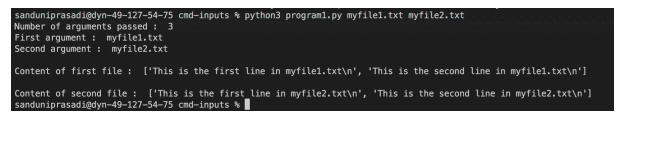
Number of arguments passed : 3
First argument : myfile1.txt
Second argument : myfile2.txt
Content of first file : [‘This is content from file1\n’]
Content of second file : [‘This is content from file2\n’]
Example 2:
Consider a python program named program2.py that takes two files myfile1.txt and myfile2.txt as inputs to the program. Here we input the absolute paths to the two files in the command line.
import sys

# this function reads a file and return its content
def read_file(file_path: str) -> str:
    f = open(file_path, 'r')
    line = f.readlines()
    f.close()
    return line

if __name__ == '__main__':
    print("Number of arguments passed : ", len(sys.argv))
    # this is the program name
    print("Oth argument : ", sys.argv[0])
    # first argument/file path
    print("First argument : ", sys.argv[1])
    # second argument/file path
    print("Second argument : ", sys.argv[2])

    print("\nContent of first file : ", read_file(sys.argv[1]))
    print("\nContent of second file : ", read_file(sys.argv[2]))
Output:
Here we use the terminal to run the python program.

Number of arguments passed : 3
0th argument : program2.py
First argument : /path/to/myfile1.txt
Second argument : /path/to/myfile2.txt
Content of first file : [‘This is content from file1\n’]
Content of second file : [‘This is content from file2\n’]
Get Solved Your Assignment(variable) and Earn A+ Grade!
Using PyCharm:
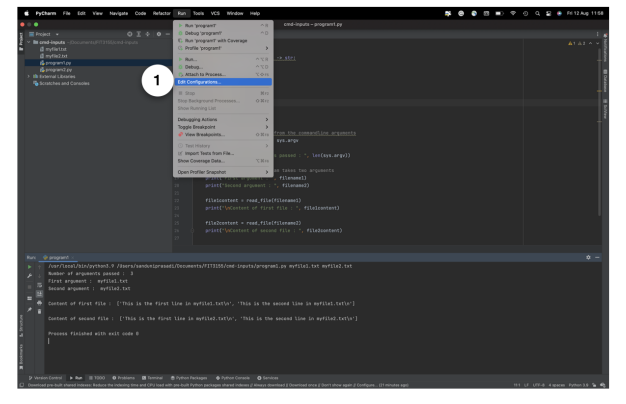
Select Edit configuration from the run tab in the menu list.
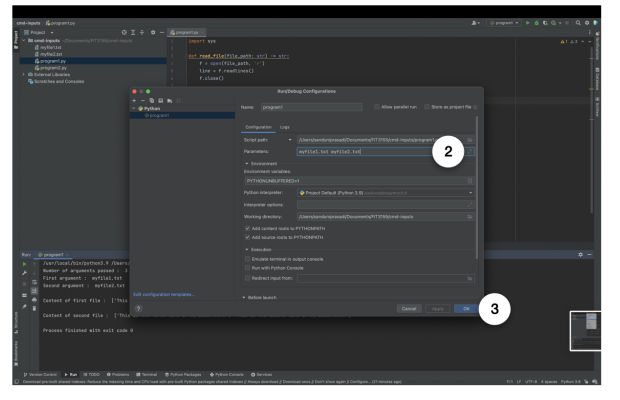
Type the file paths or arguments to your program in the text field next to parameters. Then press OK button.
Run your program.
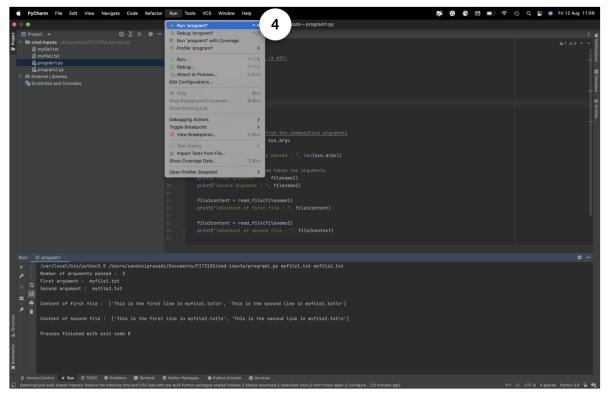
Output of the program1.py is shown below.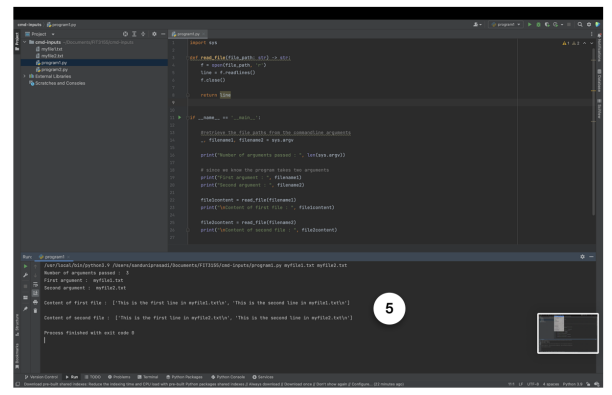
The same procedure can be carried out to run the program2.py.
Stuck in This Assignment? Deadlines Are Near?
Get Help By Expert

Recommended Assignments for You
Related University Assignments
- BFW2140 Corporate finance 1 Research-Based Assessment 2026 | MUM
- ACW1020 Accounting in Business Assignment 2, 2026 | Monash University
- MKW3000 Strategic Branding Assignment 2 Brief 2026 | Monash University
- MKW1120 Marketing Fundamentals Assignment 1 Brief 2026 | MUM
- ETW3420 Principles of Forecasting and Applications Individual Assignment 3, Monash University Malaysia
- Principle of Macroeconomics Group Assignment September 2025
- Alternative Dispute Resolution Assignment: Addressing Consumer Disputes, Contract Clauses, and Employee Rights
- Macroeconomic Growth Assignment: OLS Time-Series Analysis Using 2015–2025 Economic Data
- 3D Point Cloud Segmentation Assignment: Oil Palm Tree Classification Using ML Techniques
- Heat Sink Design Assignment Project: Thermal Optimization for T/R Module in Phased Array Antenna

Convincing Features